
When navigating CTFs, there is always a specific moment of panic when a player lands a low-privileged shell but doesn’t know how to pivot to root. They often assume they need to compile a complex zero-day exploit or write custom malware.
The reality is much simpler: the system already has the tools you need to break it. You just need to know how to use them.
Enter GTFOBins.
Table of contents
Open Table of contents
What Exactly is GTFOBins?
GTFOBins is a curated list of Unix binaries that can be exploited by an attacker to bypass local security restrictions. This technique is known as “Living off the Land” (LotL).
Instead of uploading custom malware that an intrusion detection system might immediately flag, you use the target system’s own trusted, pre-installed tools—like text editors, file readers, or archive utilities—against itself. Because these binaries are digitally signed and natively trusted, they are completely invisible to standard antivirus scans.
The Core Attack Vectors
When you search for a binary on the GTFOBins website, it categorizes the exploit strings by function. The most critical categories for privilege escalation include:
- Shell: Commands to break out of restricted, jail-like environments.
- SUID: Strings to exploit misconfigured “Set owner User ID” bits, allowing you to run a file with the permissions of its owner (usually root).
- Sudo: Bypasses used when an administrator allows a standard user to run a specific command as root without requiring a password.
When viewing a binary’s page on the GTFOBins website, the border styles on the function buttons distinguish between the direct and indirect capabilities of the binary:
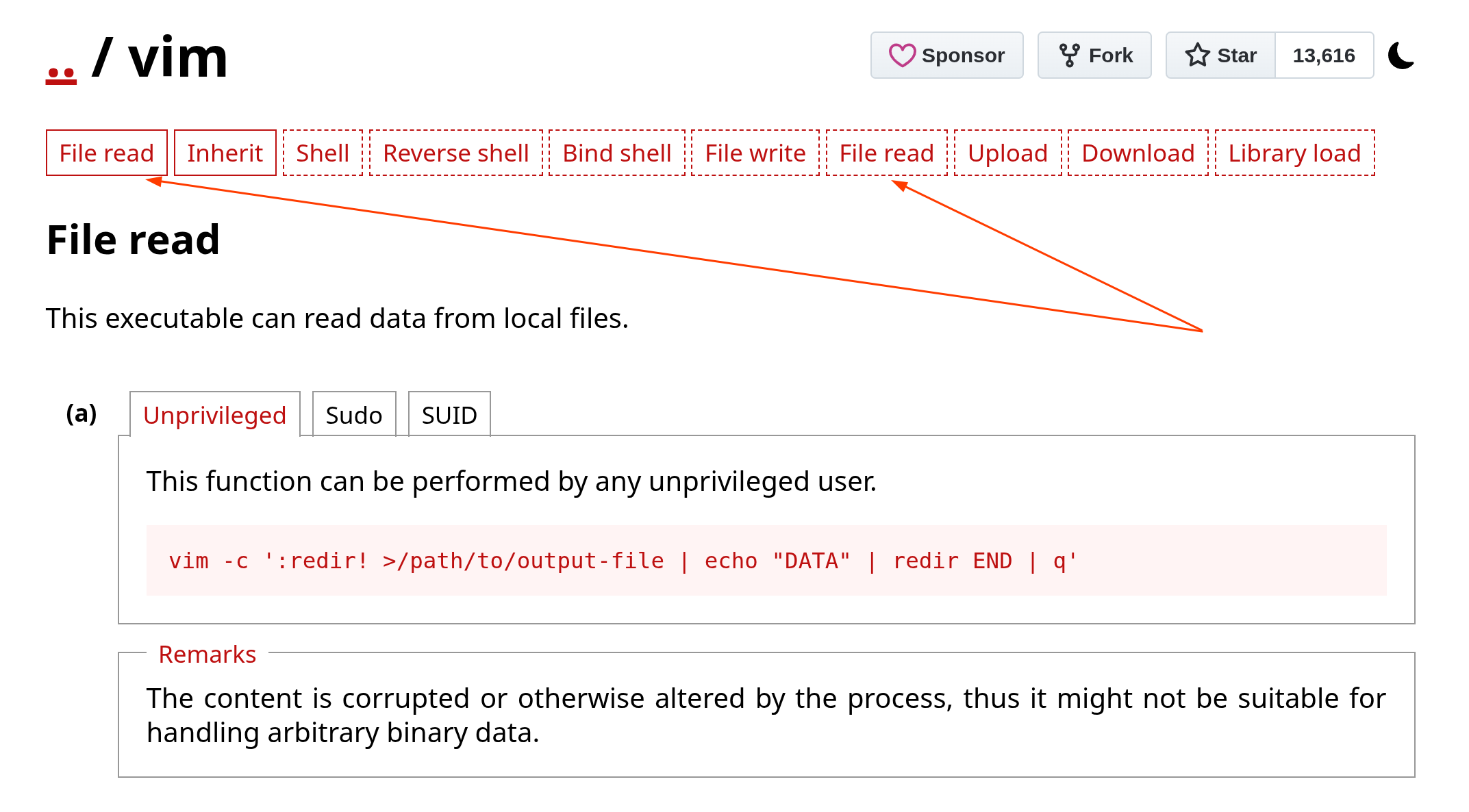
- Solid Outlines (Native Functions): Buttons with solid red borders (like File read and Inherit) represent capabilities natively supported by the binary using its own built-in features and commands.
- Dotted Outlines (Inherited Functions): Buttons with dashed or dotted red borders (like Shell, Reverse shell, Bind shell) represent inherited capabilities. If a binary has the “Inherit” function, it can invoke other supported interpreters (such as Python, Lua, or vi), granting it the exploitation functions associated with those underlying tools.
This distinction explains why a capability like File read might appear twice: once as a native capability, and again as an inherited capability provided by an embedded interpreter like in the above case for the vim binary.
Real-World Exploitation Examples
If you find a misconfigured binary during an engagement or a CTF, you don’t need to invent the syntax to exploit it. GTFOBins gives you the exact cheat codes.
1. The vim Breakout (Sudo Misconfiguration)
If an administrator allows a user to run the vim text editor as root to edit configuration files, they have accidentally given away the keys to the kingdom. GTFOBins provides this instant bypass:
sudo vim -c ':!/bin/sh'Because vim has a built-in feature that allows you to execute shell commands from within the editor using :!, running it with sudo spawns a privileged root shell instantly.
2. The tar Exploit (SUID Misconfiguration)
The tar command is just a harmless archiving tool used to zip and unzip files. However, if an admin accidentally leaves the SUID bit set on it, GTFOBins offers this payload:
tar -cf /dev/null /dev/null --checkpoint=1 --checkpoint-action=exec=/bin/shThis command forces the archive utility to execute a shell command at its very first “checkpoint.” Since the binary is running with SUID root permissions, the shell it spawns is also root.
The Defender’s Takeaway
Treat every native binary as a potential weapon. True security is not merely about patching vulnerabilities; it requires ruthless configuration management and an uncompromising approach to least privilege.
A single misconfigured SUID bit on a harmless utility will unravel your entire system hardening strategy in seconds, proving that your defenses are only as strong as your weakest configuration.